Wedding countdown on your iPhone
Add your wedding date to a countdown app and put its widget on your Home Screen. Photo Countdown is free and shows the days, weeks or months left, over a photo of the two of you. Set the widget to show the wedding, and after the day it counts the days you have been married.
Updated
Days, weeks or months?
A year before the wedding, a number like 300 days can feel far away. Weeks and months are easier to plan with: 300 days is 42 weeks and 6 days. In the last month, days work best, because each one counts.
In Photo Countdown, each widget counts in days, weeks, months or years, and you can change it at any time. Touch and hold the widget, tap Edit Widget and pick a unit under Count In. You can also put two widgets for the same wedding on your Home Screen: a small one in days and a medium one in weeks.
Set up your wedding countdown
- Open Photo Countdown and tap + to add an event.
- Under What's the occasion?, tap Wedding. It suggests a title, such as "Sam & Alex's Wedding", and a look that you can change later in Style.
- Pick the wedding date. Leave Repeats at Never.
- Add photos: up to 10 per event. The widget changes the photo during the day, using up to 6 of them.
- Turn on reminders if you want them: 1 month, 2 weeks, 1 week or 1 day before, or on the day.
- Tap Save. Then touch and hold an empty spot on your Home Screen, tap Edit, then Add Widget, and add Photo Countdown.
- Touch and hold the new widget, tap Edit Widget and pick the wedding under Event. A new widget shows your next event, which is not always the wedding.

Free for iPhone and iPad with iOS 17.6 or later. No ads and no account. Nothing is locked behind a purchase: there is no Premium, and tips are optional.
Photos that work in a small widget
A Home Screen widget is small, so the photo has to work hard. Some tips:
- Pick photos with one clear subject: the two of you, the venue or the rings.
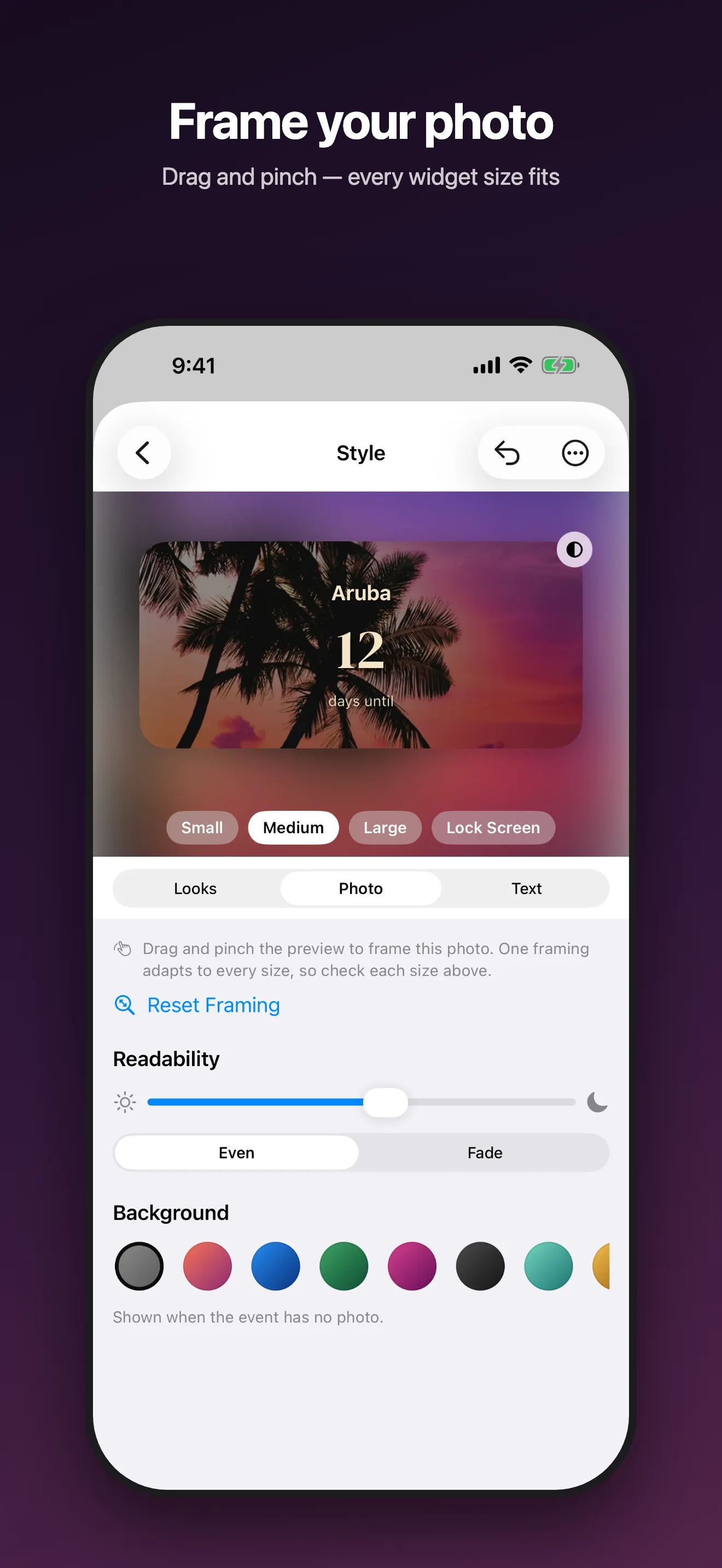
- Frame each photo in the Style editor by dragging and pinching. One framing is used for every widget size. Check the small, medium and large previews to keep faces in view.
- If a photo is busy, move the Readability slider up, so the number stays easy to read.
- Try the 10 ready-made looks and 8 fonts. Each one is previewed with your own photo.
After the wedding day
On the wedding day, the widget shows "Now!". From the next day, it counts up: 1 day since, 2 days since, and so on. So if the widget shows the wedding, it becomes a count of the days you have been married.
This works because the event's Mode is Automatic, the default. It counts down to a date in the future and counts up once the date has passed.
A widget that you leave on Next Upcoming moves on to your next event after the wedding day. To keep the wedding on it, touch and hold the widget, tap Edit Widget and pick the wedding under Event.
Would you rather count down to each anniversary? Add a second event and tap Anniversary under What's the occasion?. It repeats every year, so it always counts down to the next anniversary.
Questions
How many days until my wedding?
Count the calendar days from today to the wedding date, without today. Photo Countdown does this for you, and the number goes down by one each day. The calculator on the Days since counter page also counts the days until a future date.
Can the countdown show weeks or months?
Yes. Touch and hold the widget, tap Edit Widget and set Count In to Days, Weeks, Months or Years. Weeks shows weeks and days, for example 42 weeks, 6 days.
Can I add more than one photo?
Yes, up to 10 photos per event. The Home Screen widget changes the photo during the day, using up to 6 of them. Lock Screen widgets are monochrome and show no photo.
Can my partner see the same countdown?
There is no sync between phones. Each of you can add the wedding in Photo Countdown on your own iPhone. You can also send a picture of your countdown with Share in the app.
Are our photos private?
Yes. There is no account. Your events and photos stay on your device; only anonymous usage counts are sent.
Does Photo Countdown cost anything?
No. Nothing is locked behind a purchase: there is no Premium, and tips are optional. There are no ads.
More Photo Countdown guides
- Days since counter: How to count the days since a date on iPhone, with a free calculator for days, weeks, months and years.
- Birthday countdown: Birthday countdowns that start over every year, February 29 birthdays, and the next few birthdays in one widget.
- Christmas countdown: How many days until Christmas, counted live, and a Christmas countdown widget that repeats every year.
- Photo countdown apps compared: Photo Countdown, Kounts, Simple Count and Daymark side by side: price, photos, counting up, Apple Watch and more.
- Photo Countdown: every feature, screenshots and the full FAQ.