Birthday countdown on iPhone
Add each birthday once and set it to repeat every year. Photo Countdown then shows the days until the next birthday and starts over after each one, so you never enter the date again. To see several birthdays at once, use the Up Next widget.
Updated
Add a birthday that repeats every year
- Open Photo Countdown and tap + to add an event.
- Under What's the occasion?, tap Birthday. This sets Repeats to Every Year.
- Type a title, such as "Mom's Birthday", and pick the date. You can pick the date of birth or this year's birthday: the countdown goes to the next birthday either way.
- Add a photo of the birthday person, then tap Save.
On the birthday, the widget shows "Now!". The next day, it starts counting down to the next birthday. Events that repeat always count down, so a birthday never turns into a "days since" count.

Free for iPhone and iPad with iOS 17.6 or later. No ads and no account. Nothing is locked behind a purchase: there is no Premium, and tips are optional.
Birthdays on February 29
If someone was born on February 29, enter that date. In leap years, the countdown goes to February 29. In the other years, it goes to March 1, the day after February 28. The next February 29 is in 2028.
Some families celebrate on February 28 instead. If that is you, enter February 28.
The next few birthdays in one widget
Add every birthday you want to remember. The Up Next widget then lists your next few events in date order, each with its own count. It comes in medium, large and extra-large sizes. To add it, touch and hold an empty spot on your Home Screen, tap Edit, then Add Widget, and pick Up Next.
A Photo Countdown widget that you leave as it is also follows your next event, and moves on once its day has passed. To keep one person's birthday on a widget, touch and hold the widget, tap Edit Widget and pick the event.
Reminders in time for a gift
In each event, you can turn on reminders: on the day, or 1 day, 1 week, 2 weeks or 1 month before, at a time you pick. A birthday that repeats every year reminds you every year. A reminder 2 weeks before leaves time to order a gift or post a card.
Give each birthday its own look
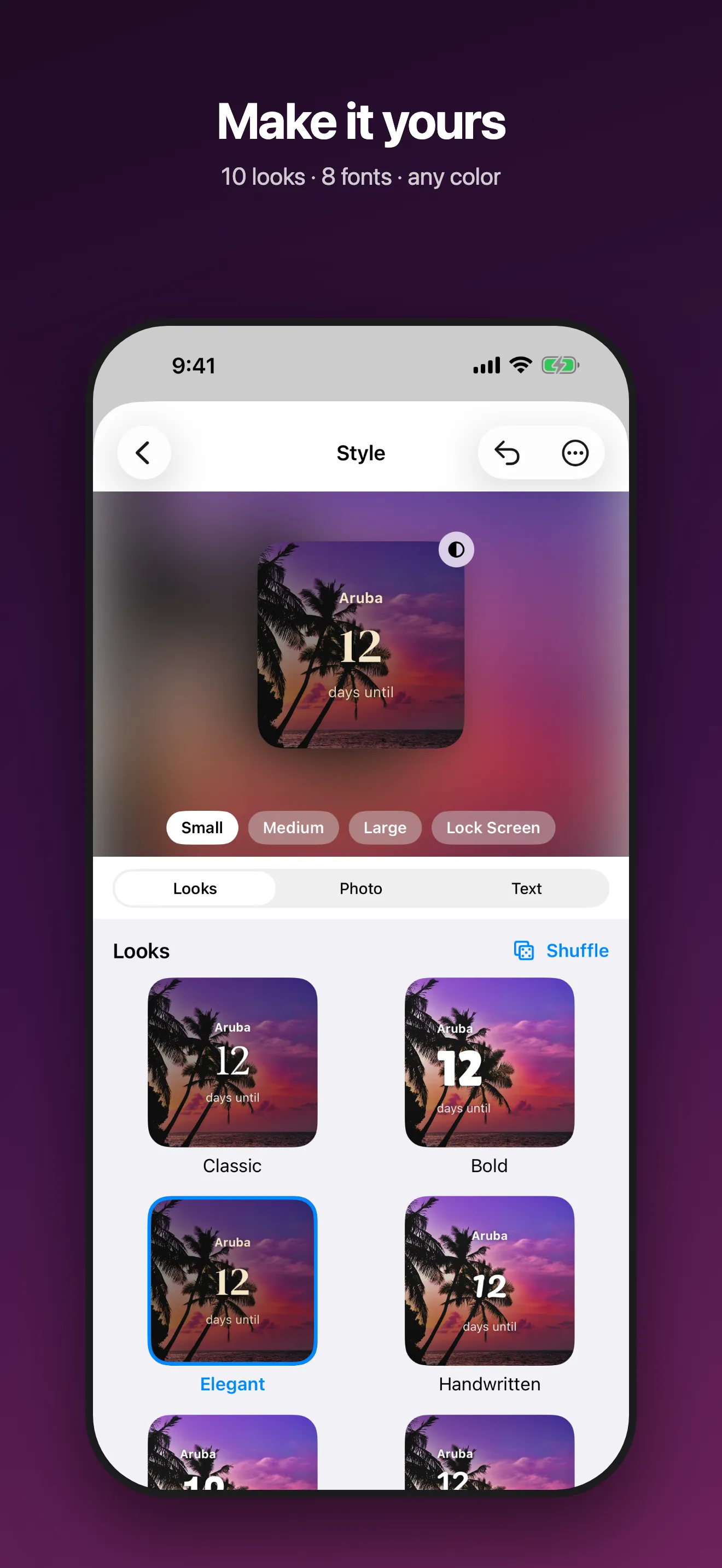
Each event has its own style. Pick one of 10 ready-made looks, one of 8 fonts and any text color, and see it live with the birthday person's photo. Drag and pinch the photo to frame it. One framing is used for every widget size, so check the small, medium and large previews to keep their face in view.
You can add up to 10 photos to one event, for example one from each year. The Home Screen widget changes the photo during the day, using up to 6 of them. On the Lock Screen, the widgets are monochrome and show no photo.
Questions
How many days until my birthday?
Count the days from today to your next birthday. If this year's birthday has passed, count to next year's. Photo Countdown does this for you and starts over every year. The calculator on the Days since counter page counts the days until any date.
Does the countdown start over after the birthday?
Yes, when Repeats is Every Year. The Birthday choice sets it for you. On the birthday the widget shows "Now!", and from the next day it counts down to the next one.
What happens with a February 29 birthday?
In leap years, the countdown goes to February 29. In other years, it goes to March 1. If you celebrate on February 28, enter February 28 instead.
Can I see the next few birthdays in one widget?
Yes. The Up Next widget lists your next 3 events (medium) or 6 (large) in date order, each with its own count. It shows events of any kind, not only birthdays.
Can I count in weeks or months?
Yes. Touch and hold the widget, tap Edit Widget and set Count In to Weeks or Months. Each widget has its own setting.
Does Photo Countdown cost anything?
No. Nothing is locked behind a purchase: there is no Premium, and tips are optional. There are no ads and no account.
More Photo Countdown guides
- Days since counter: How to count the days since a date on iPhone, with a free calculator for days, weeks, months and years.
- Wedding countdown: A countdown to the wedding day in days, weeks or months, with your own photos, and how to count the days married afterwards.
- Christmas countdown: How many days until Christmas, counted live, and a Christmas countdown widget that repeats every year.
- Photo countdown apps compared: Photo Countdown, Kounts, Simple Count and Daymark side by side: price, photos, counting up, Apple Watch and more.
- Photo Countdown: every feature, screenshots and the full FAQ.